






Understand how the internet actually works, from browsers and websites to IP addresses, Wi-Fi, and safe browsing habits explained simply.
Introduction
You use the internet dozens of times a day, but have you ever stopped to wonder what’s actually happening when you type a web address and a page loads in seconds? The internet is a massive, invisible system working quietly in the background. This post breaks it all down, browsers, websites, IP addresses, Wi-Fi, and safe browsing, in plain, beginner-friendly language. By the end, you’ll have a clear picture of what’s going on every time you go online.
What Is the Internet? (Simple Explanation)
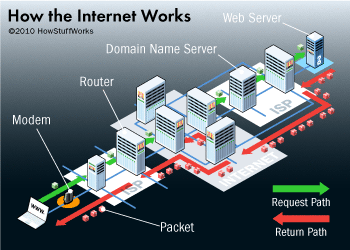
The internet is a global network of computers and other devices connected together to share information. Think of it like a massive web of roads, data travels along those roads from one device to another, no matter where in the world they are. The World Wide Web (websites you visit) is just one of the many things that run on top of this network, alongside email, video calls, and online gaming.
Why It Matters
The internet is the backbone of modern communication, commerce, education, and entertainment. Whether you’re sending an email, paying a bill, attending an online class, or watching a video, you’re relying on the internet to move information between you and another point. Understanding how it works helps you browse more safely, solve connection problems faster, and appreciate just how remarkable this everyday tool really is.
Key Concepts You Need to Know
IP Addresses
Every device connected to the internet has an IP (Internet Protocol) address, a unique string of numbers that acts like a home address. When you request a webpage, your IP address tells the internet where to send the response.
Browsers and Search Engines
A browser (like Chrome, Firefox, or Safari) is the software you use to access and display websites. A search engine (like Google or Bing) is a website that helps you find other websites by indexing billions of pages. They are not the same thing, the browser is the vehicle; the search engine is the map.
How Websites Are Served
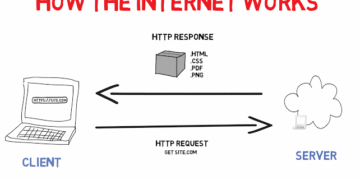
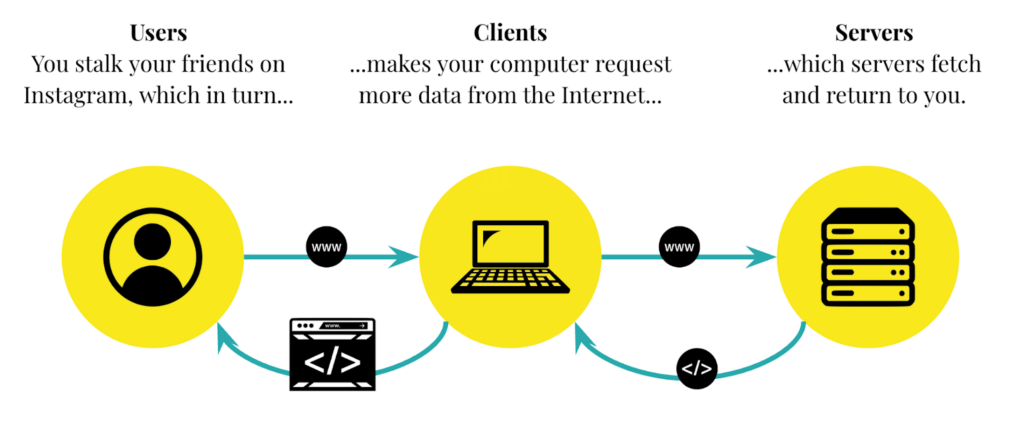
When you type a web address, your browser sends a request to a server, a powerful computer that stores the website’s files. The server sends those files back to your browser, which then assembles and displays the page. This entire exchange happens in milliseconds, thanks to a system called DNS (Domain Name System), which translates website names into the IP addresses computers understand.
Wi-Fi and Data Transfer
Wi-Fi is a wireless technology that connects your device to a local router, which in turn connects to the wider internet via your Internet Service Provider (ISP). Data travels in small chunks called packets, which are reassembled in the right order once they reach their destination.
Safe Browsing Habits
Not every website is trustworthy. Look for “https://” at the start of a web address, the “s” means the connection is encrypted and more secure. Avoid clicking on suspicious links in emails or pop-ups, keep your browser updated, and never enter personal details on sites you don’t recognize.
Common Mistakes or Misconceptions
- “The internet and the World Wide Web are the same thing.” The internet is the global network of connected devices. The Web is just one service that runs on it, websites accessed through a browser.
- “A private or incognito browser tab makes you invisible online.” Incognito mode stops your browser from saving your history locally, but your ISP, employer, or the websites you visit can still see your activity.
- “A fast device means a fast internet connection.” Internet speed depends on your ISP plan, router quality, and network traffic, not on how powerful your computer is.
Practical Next Steps
Start building internet awareness with these simple actions:
- Check the address bar on your favourite websites, notice which ones use “https://” and which don’t.
- Open your router settings (usually at 192.168.1.1 in your browser) to see what’s connected to your home network.
- Run a free internet speed test at speedtest.net to understand your current connection speed and what it means.
Key Takeaways
- The internet is a global network of connected devices that share information using IP addresses.
- Browsers display websites; search engines help you find them, they are different tools.
- Data travels in small packets between your device, a router, and a remote server.
- Safe browsing habits, checking for https, avoiding suspicious links, keeping software updated, protect you online.
Related Reading
- Previous week: Computer Fundamentals Everyone Should Know
- Coming up in Week 4: Essential Digital Skills for Students and First-Time Tech Users
Call to Action: Subscribe for next week’s post on digital literacy, email, cloud storage, passwords, and the online skills everyone needs today.