







A clear, practical guide to understanding the difference between LAN and WAN, what they are, how they work, where they are used, and why the distinction matters in networking and IT.
Introduction
LAN and WAN are two of the most fundamental terms in networking, and two of the most commonly confused. You will encounter them in job descriptions, network diagrams, IT textbooks, router settings, and certification exams. Understanding the difference between them is not just a matter of memorising definitions; it shapes how you think about network design, performance, security, and troubleshooting at every scale, from a single home to a global enterprise. This post breaks down what LANs and WANs are, how they differ, how they connect, and how each is used in the real world. By the end, the distinction will be completely clear and permanently useful.
What Are LAN and WAN? (Simple Explanation)
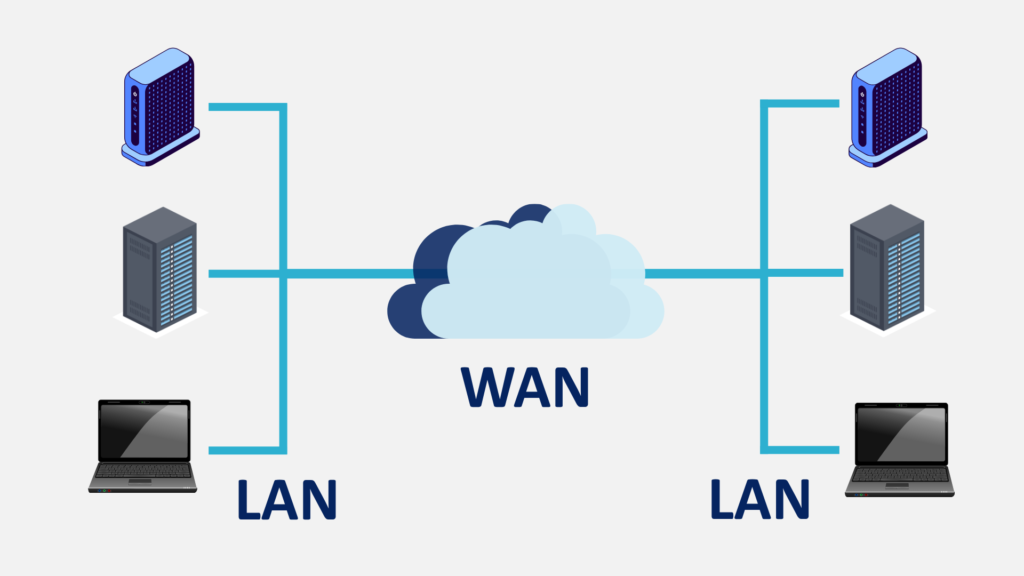
A LAN (Local Area Network) is a network that connects devices within a limited geographic area, a home, a single office floor, a school building, or a data centre. A WAN (Wide Area Network) is a network that connects devices or smaller networks across large geographic distances, cities, countries, or even continents. The internet is the largest and most well-known WAN in existence. If a LAN is the road network inside a single town, a WAN is the highway system connecting towns across an entire country.
Why It Matters
The LAN/WAN distinction is foundational to every area of networking. It determines what hardware is needed, what security measures are appropriate, how data transfer speeds are managed, and how costs are structured. IT professionals designing infrastructure for a business need to understand both, LANs for the internal office environment and WANs for connecting multiple sites or reaching the internet. Even for home users, understanding the distinction explains why internet speed is different from local network speed, and why some tasks (like sharing files between devices on the same network) are much faster than others (like uploading to the cloud).
Key Concepts You Need to Know
LAN, Local Area Network
A LAN connects devices within a small, defined geographic area and is typically owned, operated, and managed by a single organisation or individual. LANs are characterised by high data transfer speeds (often 1 Gbps or more over wired connections), low latency, and relatively low cost to set up and maintain. Common LAN technologies include Ethernet (for wired connections) and Wi-Fi (for wireless connections). In a home, your LAN consists of all the devices connected to your router, laptops, phones, smart TVs, printers, communicating with each other and sharing a single connection to the internet.
WAN, Wide Area Network
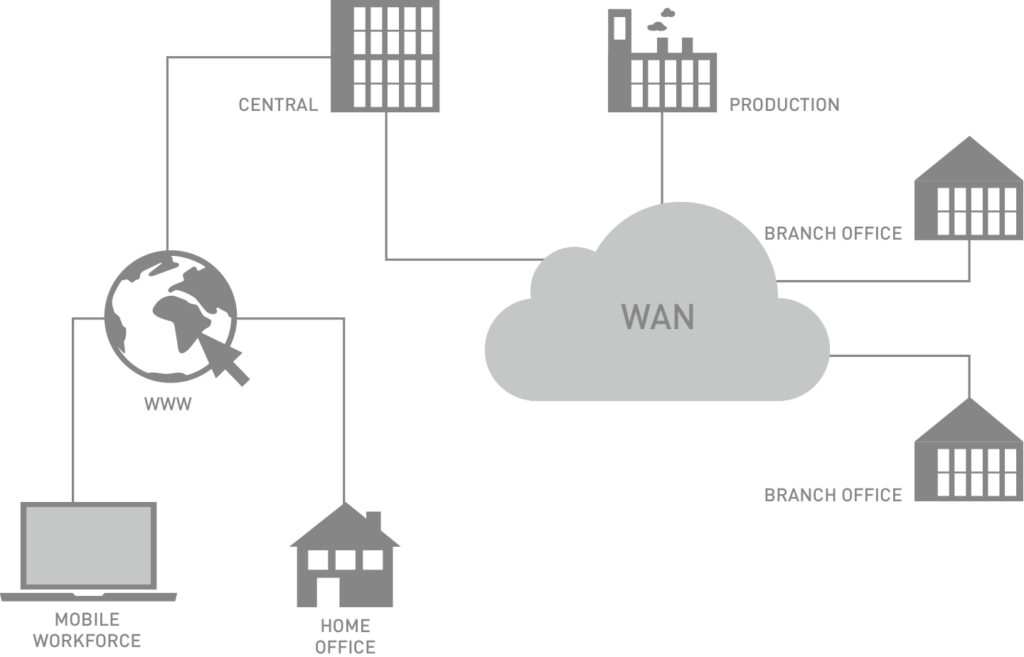
A WAN connects multiple LANs or individual devices across large distances, typically using infrastructure provided by telecommunications companies, fibre optic cables, leased lines, satellite links, or cellular networks. WANs are characterised by lower speeds than LANs (due to the distances involved and shared infrastructure), higher latency, and higher cost. Businesses with offices in multiple cities or countries use WANs to connect those locations into a single unified network. The internet is a public WAN; corporate WANs are often private, using technologies like MPLS (Multiprotocol Label Switching) or SD-WAN (Software-Defined WAN) to ensure reliability and security.
MAN, Metropolitan Area Network
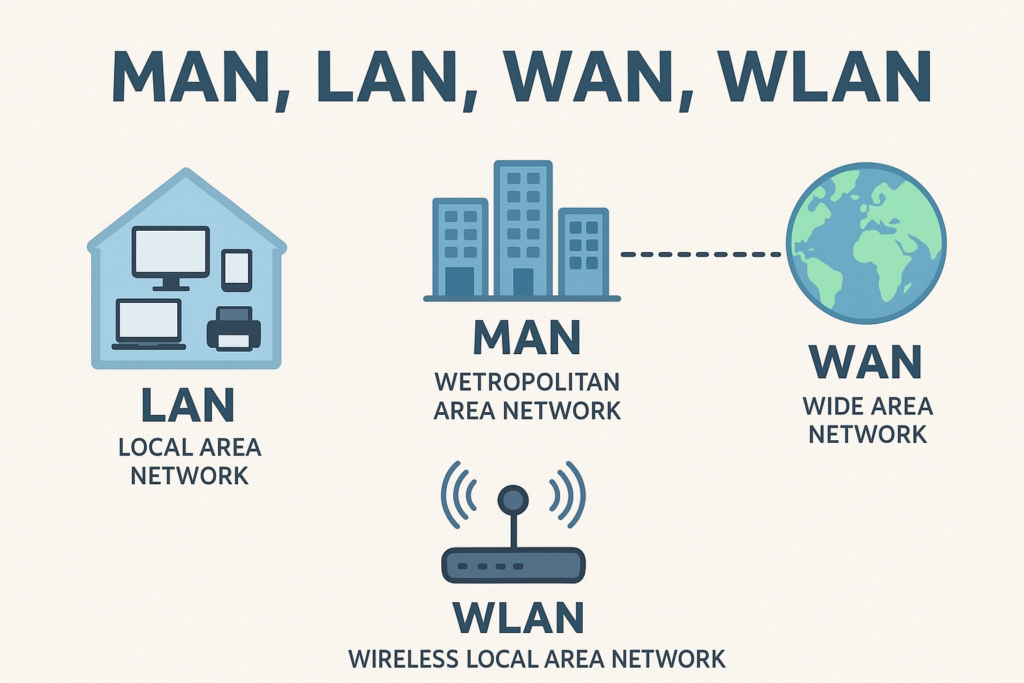
Between LAN and WAN sits the MAN (Metropolitan Area Network), a network that spans a city or large campus. MANs are less commonly discussed but important to know. Universities often use MANs to connect multiple buildings across a campus. City governments may use them to link public buildings, libraries, and municipal services. A MAN is larger than a LAN but smaller and more geographically contained than a WAN.
How LAN and WAN Connect
In a typical business setup, each office location has its own LAN, connecting computers, printers, servers, and other devices internally. Those LANs are then connected to each other and to the internet via a WAN. The router at each location acts as the boundary between the LAN and the WAN, managing traffic between the local devices and the outside world. Security measures like firewalls and VPNs are applied at this boundary to control and protect data flowing between the two environments.
Speed and Performance Differences
LAN connections are significantly faster than WAN connections. A standard wired LAN connection runs at 1 Gbps (gigabit per second); enterprise LANs can reach 10 Gbps or more. WAN connections, your home internet plan, for example, typically range from tens to hundreds of Mbps, and even the fastest consumer plans top out well below what a local wired network can achieve. This is why transferring a large file between two computers on the same LAN is much faster than uploading that same file to cloud storage over the internet.
Security Considerations
Because LANs are private and controlled by the organisation or individual that owns them, they are generally more trusted environments. WANs, especially the public internet, are untrusted by default, which is why security controls (firewalls, encryption, VPNs, intrusion detection systems) are concentrated at the point where the LAN meets the WAN. The zero-trust security model, increasingly adopted by enterprises, challenges the assumption that anything inside the LAN is automatically safe, treating every connection as potentially untrusted regardless of its origin.
Common Mistakes or Misconceptions
- “My home Wi-Fi is the internet.” Your home Wi-Fi is a LAN, a local wireless network created by your router. It connects your devices to each other and to your router, which then connects to the internet (a WAN) via your modem and ISP. The two are distinct: you can have a functioning LAN with no internet access at all.
- “WAN is always slower than LAN.” While WAN connections are typically slower than local wired LAN connections, enterprise-grade WAN links using modern fibre infrastructure can achieve very high speeds. The speed difference is closing, but LANs still hold the advantage for internal, high-volume data transfer.
- “LAN security is not important because it is private.” Internal threats, whether from malicious insiders, compromised devices, or lateral movement by an attacker who has already breached the perimeter, are a significant and growing concern. LAN security deserves as much attention as perimeter defences.
Practical Next Steps
Deepen your understanding of LAN and WAN with these hands-on actions:
- Open your router’s admin panel and look at the WAN settings, you will typically see your router’s public IP address (assigned by your ISP) and your LAN settings showing the private IP addresses assigned to your connected devices. The contrast between the two makes the LAN/WAN boundary very visible.
- Run a speed test at speedtest.net to measure your WAN (internet) speed, then transfer a large file between two devices on your home network and time it, the difference in speed illustrates the LAN vs WAN performance gap directly.
- If you are studying for CompTIA Network+ or Cisco CCNA, draw a network diagram that includes at least two LAN sites connected via a WAN, label the routers, switches, and the WAN link between them. Diagramming network topologies is a core skill in both certifications.
Key Takeaways
- A LAN connects devices within a small geographic area; a WAN connects devices or networks across large distances, the internet is the world’s largest WAN.
- LANs are faster, lower-latency, and lower-cost to operate than WANs; they are typically owned and managed by a single organisation.
- The router is the boundary between the LAN and the WAN, managing traffic and enforcing security between the two environments.
- Understanding LAN and WAN is foundational for network design, troubleshooting, security planning, and IT certification exams.
Related Reading
- Previous post: Understanding Routers, Switches, and Modems
- Coming up next: Basic Network Troubleshooting Tips
Call to Action: Subscribe for next week’s post, a practical, step-by-step guide to diagnosing and fixing the most common network problems, using tools and techniques that IT professionals rely on every day.