







What is the difference between a router, a switch, and a modem? This clear, practical guide explains what each device does, how they work together, and how to get the most from your network setup.
Introduction
Most people have a box (or two) plugged into the wall that somehow connects their devices to the internet, and that is roughly where their understanding ends. Routers, switches, and modems are the three foundational pieces of networking hardware, and confusing them, or not knowing what each one does, makes troubleshooting problems, upgrading your setup, or understanding IT infrastructure far harder than it needs to be. This post gives you a clear, practical explanation of what each device does, how they differ, how they work together, and what to look for when setting up or improving a network. By the end, you will be able to look at any network diagram or home setup and immediately understand what each component is doing.
What Are Routers, Switches, and Modems? (Simple Explanation)
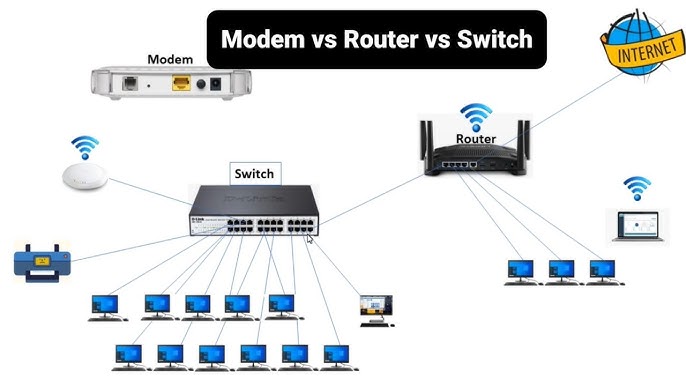
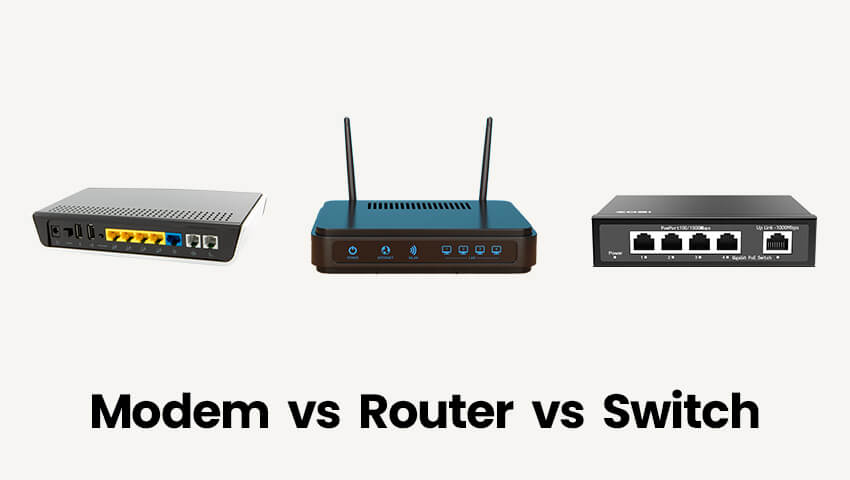
These three devices each play a distinct role in getting data from the internet to your screen. A modem connects your home or office network to your Internet Service Provider (ISP), it is the gateway between your private network and the wider internet. A router manages traffic within your network and between your network and the internet, directing data to the right device. A switch connects multiple wired devices within the same local network, allowing them to communicate with each other directly and efficiently. In many home setups, all three functions are combined into a single device, but understanding them separately is essential for anyone working in IT or managing anything beyond a basic home network.
Why It Matters
Whether you are troubleshooting a dropped connection, designing a network for a business, studying for an IT certification, or simply trying to understand why your Wi-Fi is slow in certain rooms, knowing what each piece of hardware does puts you in control. It also helps you ask the right questions when dealing with ISP support, IT teams, or hardware vendors, and saves you from buying equipment you do not need or missing equipment you do.
Key Concepts You Need to Know
The Modem, Your Gateway to the Internet
A modem (short for modulator-demodulator) is the device that connects your local network to your ISP’s network. It translates the signal from your ISP, which may arrive via a phone line (DSL), coaxial cable, or fibre optic connection, into a digital signal that your network equipment can use. Without a modem, your local network has no connection to the outside world. Your ISP typically provides a modem as part of your service, though you can often purchase your own for better performance or to avoid rental fees.
The Router, Your Network’s Traffic Controller
A router directs data traffic between devices on your network and between your network and the internet. It assigns private IP addresses to each connected device (via a protocol called DHCP), maintains a routing table that records where to send data, and acts as the first line of defence for your network through its built-in firewall. Routers also broadcast your Wi-Fi signal if they include wireless capability, which most modern home routers do. When you connect your laptop to your home Wi-Fi, you are connecting to your router, which then communicates with your modem to reach the internet.
The Switch, Your Wired Connection Hub
A switch connects multiple wired devices within the same local network, computers, printers, network-attached storage, and servers, allowing them to communicate directly with each other at high speeds. Unlike older hubs (which broadcast all data to every connected device), a switch is intelligent: it learns which device is connected to which port and sends data only to the intended recipient. Switches are essential in office and enterprise environments where many devices need reliable, fast, wired connections. Home users with only a few wired devices often do not need a separate switch, since their router typically includes several Ethernet ports.
How They Work Together
In a typical home setup, the process flows like this: your ISP delivers an internet signal to your modem via a cable entering your building. The modem connects to your router (usually via an Ethernet cable), which then creates your local network, both wired and wireless. Devices connect to the router directly (via Ethernet or Wi-Fi), and the router manages which data goes where. If you have many wired devices, a switch can be connected to one of the router’s Ethernet ports to expand the number of available wired connections. Modem to Router to Switch to Devices is the standard flow in larger setups.
All-in-One Devices
Many ISPs provide a combined modem-router, sometimes called a gateway, in a single unit. These are convenient and sufficient for most home users. However, they often offer less control, performance, and flexibility than separate dedicated devices. IT professionals and enthusiasts frequently replace ISP-provided equipment with dedicated modems and routers for better performance, security features, and customisation options.
Wireless Access Points
A wireless access point (WAP) is a device that extends Wi-Fi coverage by creating an additional wireless connection point within a network, useful in large homes, multi-floor offices, or buildings with thick walls. Unlike a router, a WAP does not manage network traffic or assign IP addresses, it simply extends the wireless signal from the existing router. Mesh networking systems (like Google Nest Wi-Fi or Eero) are a consumer-friendly version of this concept, using multiple access points that work seamlessly together to blanket a large area in consistent Wi-Fi coverage.
Common Mistakes or Misconceptions
- “Restarting my router fixes everything.” Restarting your router clears its temporary memory and re-establishes connections, which resolves many common issues. But if the problem is with your modem or your ISP’s infrastructure, restarting the router alone will not help. Always restart both the modem and the router, modem first, then router, and allow each to fully boot before testing the connection.
- “A faster router means faster internet.” Your router cannot make your internet connection faster than the plan you pay for from your ISP. A better router improves Wi-Fi coverage, handles more simultaneous connections efficiently, and reduces congestion within your local network, but it cannot exceed the bandwidth your ISP delivers.
- “Switches and hubs are the same thing.” They are not. A hub sends data to every device on the network regardless of the intended recipient, creating unnecessary traffic and slowing the network. A switch sends data only to the specific device it is addressed to. Hubs are largely obsolete; switches are the standard for modern wired networks.
Practical Next Steps
Build your networking hardware knowledge with these practical steps:
- Identify the devices in your own home or office network, locate your modem, router, and any switches or access points. Check whether your ISP has provided an all-in-one gateway or separate devices.
- Log into your router’s admin panel (typically accessed at 192.168.1.1 or 192.168.0.1 in your browser) and explore the settings, look at connected devices, your Wi-Fi network name and password settings, and any security options like firewall settings.
- If you are studying for a networking certification like CompTIA Network+ or Cisco CCNA, draw a simple diagram of your home network showing how each device connects, this habit of visualising network topology is a core skill tested in both certifications.
Key Takeaways
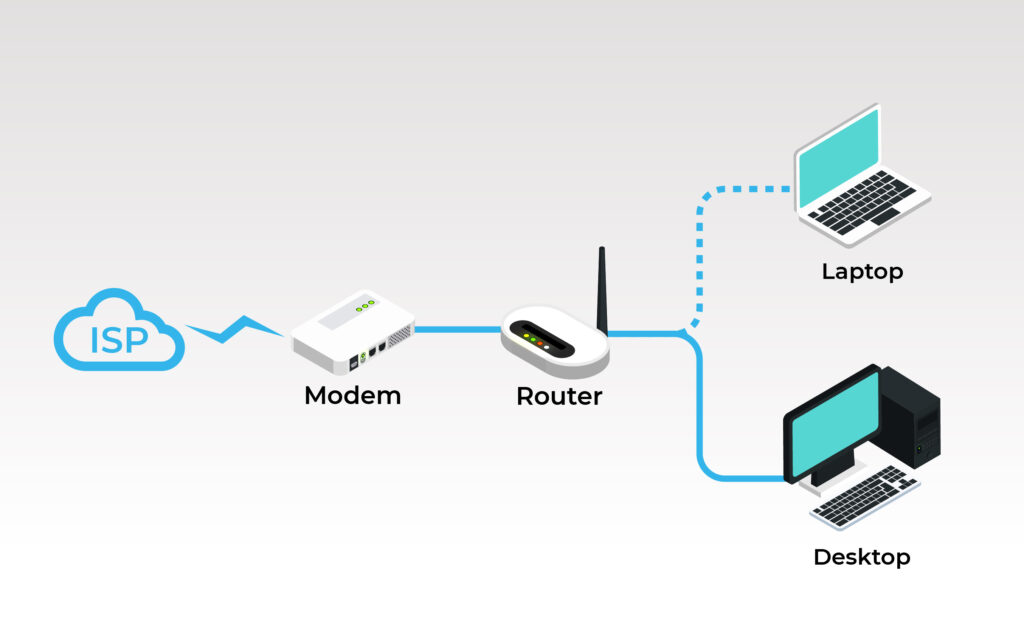
- A modem connects your local network to your ISP; a router manages traffic within your network and between it and the internet; a switch connects multiple wired devices within the local network.
- In most home setups, the router handles both routing and Wi-Fi; a separate switch is needed only when more wired connections are required.
- Many ISPs provide all-in-one gateway devices combining modem and router, convenient for home users, but limiting for those who need greater control or performance.
- Restarting both modem and router (in that order) resolves the majority of common home network issues.
Related Reading
- Previous post: Networking Basics: How Devices Connect and Communicate
- Coming up next: LAN vs WAN: What’s the Difference?
Call to Action: Subscribe for next week’s post where we break down the difference between LAN and WAN, two of the most fundamental concepts in networking, explained clearly with real-world examples.